
If you run scraping, parsing, or automation workflows through residential or mobile proxies, you have probably encountered this situation: the IP looks clean, the proxy provider guarantees a low ban rate, and the target site still throws a CAPTCHA at you. It happens on the first request, the tenth, or right in the middle of a session that was working fine a minute ago.
This is a common misunderstanding. A high-quality residential or mobile proxy can improve the network-level credibility of a request by providing an IP associated with a consumer ISP or mobile carrier. However, it does not guarantee that the IP has a clean reputation, nor does it prevent CAPTCHA challenges triggered by browser fingerprints, session inconsistencies, request patterns, or other behavioral signals. Anti-bot systems don't just check where a request comes from. They look at how the session behaves, whether the fingerprint matches a real browser, and whether the traffic pattern looks automated. A residential or mobile IP can pass the first check and still fail the second.
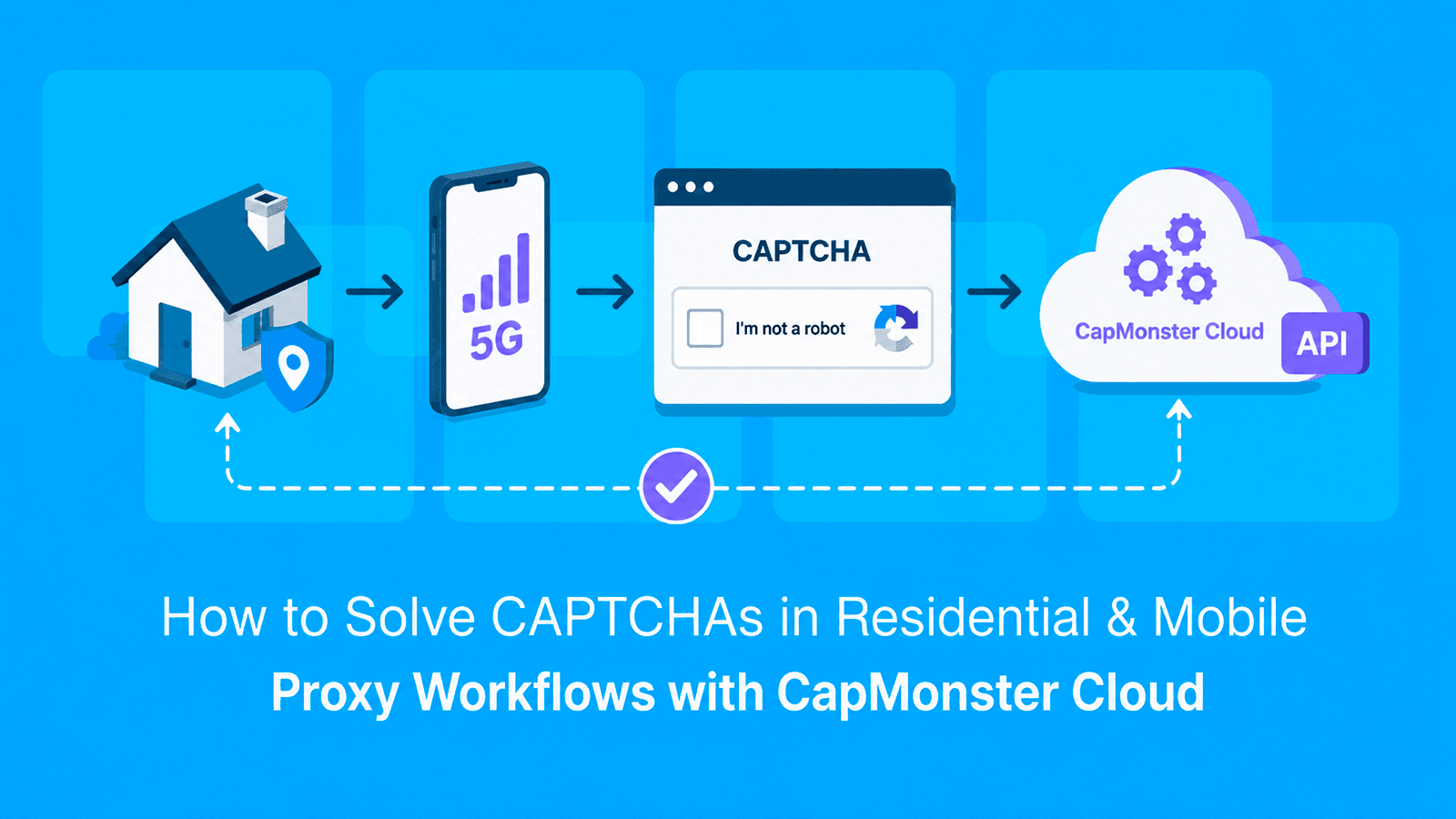
That's where a dedicated CAPTCHA-solving layer comes in. Instead of manually solving challenges or building your own solver, you can integrate CapMonster Cloud into the same workflow that manages your proxies. The proxy provides the residential or mobile source IP and related network attributes, while your browser or HTTP client maintains the rest of the session state. When your workflow detects a supported CAPTCHA, it can create a task in CapMonster Cloud and retrieve the corresponding solution through getTaskResult. The exact result depends on the CAPTCHA and task type.
Get started now and automate your CAPTCHA-solving workflow
Why CAPTCHAs Still Appear Even With Good Proxies
It helps to separate two things that often get lumped together: IP reputation and behavioral detection.
IP reputation reflects factors such as the network an IP belongs to, its ASN, previous abuse history, and how the address has been used. Residential and mobile IPs may have an advantage over datacenter IPs because they originate from consumer ISPs or mobile carrier networks. However, individual IP reputation still depends on factors such as previous abuse, request history, and usage patterns.
Behavioral detection examines additional signals such as TLS fingerprints, browser characteristics, request patterns, timing, and session consistency. A residential IP with bot-like browser or request characteristics can still be classified as automated traffic and may trigger additional verification, rate limiting, or blocking.
Mobile networks commonly use carrier-grade NAT, which can allow multiple subscribers to share the same public IP address. This can make IP reputation alone less informative, so anti-bot systems may combine network-level signals with browser, device, session, and behavioral indicators. The exact weighting of these signals varies by platform and implementation.
Rotating an IP in the middle of a stateful workflow can create inconsistencies between the IP address, cookies, browser state, and CAPTCHA challenge. Rotation can still be useful between independent sessions or tasks, but keeping the same IP throughout one CAPTCHA solve-and-submit cycle generally provides better session consistency.
How CapMonster Cloud Fits Into a Proxy-Based Workflow
CapMonster Cloud doesn't replace your proxy pool — it works alongside it as a separate layer in the workflow. The two components handle different parts of the request:
- The proxy provides the residential or mobile source IP and associated network attributes, such as the ASN and approximate geolocation. The browser or HTTP client remains responsible for maintaining consistent cookies, headers, User-Agent, TLS behavior, and other session-level signals.
- CapMonster Cloud processes the supported CAPTCHA task and returns the corresponding solution. Depending on the CAPTCHA type, the result may be a token or another structured response.
For this kind of workflow, common CAPTCHA and anti-bot systems documented by CapMonster Cloud include reCAPTCHA v2 and v3, Cloudflare Turnstile, and GeeTest. CapMonster Cloud also supports several other challenge types, each with its own task parameters and result format.
The request flow, end-to-end, generally looks like this:
- Your script or workflow opens a session through the residential or mobile proxy.
- The target page returns a CAPTCHA or another supported challenge.
- Your code sends a
createTaskrequest to CapMonster Cloud with the parameters required by the selected CAPTCHA type and, when supported and necessary, your proxy details. - Your code polls
getTaskResultuntil CapMonster Cloud returns the corresponding solution. - Your workflow uses that solution as required by the target site's authorized integration while maintaining any relevant session state.
For task types that use your own proxy, consistency between the solving and submission stages can matter, along with cookies, User-Agent, headers, and other session data. The exact requirements depend on the CAPTCHA type and the target implementation.
What You Need
Before wiring this together, make sure you have the following in place:
- a CapMonster Cloud account and an API key;
- a positive account balance;
- access to a residential or mobile proxy pool, including the endpoint, port, and the authentication details required by your provider;
- a script or browser-automation environment — this guide uses Python and JavaScript examples. If your workflow uses Playwright or Puppeteer, the returned solution must be applied according to the CAPTCHA type and the target site's authorized integration.
If your workflow requires the same proxy IP across multiple steps, sticky-session support is especially useful because it lets you keep the IP stable for the duration of the solve-and-submit cycle. The exact proxy requirements depend on the CAPTCHA task type and target implementation.
Step-by-Step: Solving a CAPTCHA Inside a Proxy Session
Set Up the Proxy Session
Start by routing your requests through a residential or mobile proxy. When the workflow requires IP consistency, keep the same proxy IP active throughout the relevant page-load, CAPTCHA-solving, and submission steps. Many proxy providers implement sticky sessions through a session identifier in the proxy username or another provider-specific configuration parameter.
Python
import requests

proxy_url = "http://user-session-abc123:[email protected]:10000"

proxies = {
    "http": proxy_url,
    "https": proxy_url
}

session = requests.Session()
session.proxies.update(proxies)

response = session.get(
    "https://target-site.com/login",
    timeout=30
)

response.raise_for_status()
Using requests.Session() also allows cookies returned by the target site to persist across subsequent requests made through the same session.
JavaScript
const axios = require("axios");
const { HttpsProxyAgent } = require("https-proxy-agent");

const proxyUrl =
  "http://user-session-abc123:[email protected]:10000";

const agent = new HttpsProxyAgent(proxyUrl);

const response = await axios.get(
  "https://target-site.com/login",
  {
    httpsAgent: agent,
    timeout: 30000,
  }
);
This JavaScript example keeps the same proxy configuration, but Axios in Node.js does not automatically maintain a persistent cookie jar. If later requests must preserve cookies and other website session state, add a cookie-management mechanism or use a persistent browser context with a tool such as Playwright or Puppeteer.
Send the Task to the CapMonster Cloud API
Once you've confirmed that the page contains a CAPTCHA, identify the parameters required for that specific CAPTCHA type and send a createTask request to CapMonster Cloud.
Proxy handling depends on the task type. For reCAPTCHA v2, RecaptchaV2Task uses CapMonster Cloud's built-in proxies by default. If the target site does not accept the resulting token or IP consistency is required, the same task type can also be configured with your own proxy details. In that case, CapMonster Cloud recommends using the same proxy when solving the CAPTCHA and submitting the token to the target site.
The standard reCAPTCHA v3 task uses RecaptchaV3TaskProxyless and is executed through CapMonster Cloud's own proxy infrastructure. For reCAPTCHA v3, correctly identifying parameters such as pageAction and minScore is especially important.
Python
import requests

payload = {
    "clientKey": "YOUR_API_KEY",
    "task": {
        "type": "RecaptchaV2Task",
        "websiteURL": "https://target-site.com/login",
        "websiteKey": "SITE_KEY_FROM_PAGE",
        "proxyType": "http",
        "proxyAddress": "203.0.113.10",
        "proxyPort": 10000,
        "proxyLogin": "user-session-abc123",
        "proxyPassword": "password"
    }
}

resp = requests.post(
    "https://api.capmonster.cloud/createTask",
    json=payload,
    timeout=30
)

resp.raise_for_status()
data = resp.json()

if data.get("errorId"):
    raise RuntimeError(
        f"{data.get('errorCode')}: {data.get('errorDescription')}"
    )

task_id = data["taskId"]
JavaScript
const axios = require("axios");

const payload = {
  clientKey: "YOUR_API_KEY",
  task: {
    type: "RecaptchaV2Task",
    websiteURL: "https://target-site.com/login",
    websiteKey: "SITE_KEY_FROM_PAGE",
    proxyType: "http",
    proxyAddress: "203.0.113.10",
    proxyPort: 10000,
    proxyLogin: "user-session-abc123",
    proxyPassword: "password",
  },
};

const { data } = await axios.post(
  "https://api.capmonster.cloud/createTask",
  payload,
  { timeout: 30000 }
);

if (data.errorId) {
  throw new Error(
    `${data.errorCode}: ${data.errorDescription}`
  );
}

const taskId = data.taskId;
For reCAPTCHA v2, RecaptchaV2Task uses CapMonster Cloud's built-in proxies by default, so you can omit the proxy fields when creating the task. According to CapMonster Cloud, the built-in proxies are suitable for most websites. If the resulting token is not accepted by the target site, retry the task with your own proxy by adding the required proxy fields. In that case, use the same proxy when solving the CAPTCHA and submitting the token to the target site.
Poll for the Result
CAPTCHA solving is asynchronous, so after creating the task, poll getTaskResult until the status changes from processing to ready. CapMonster Cloud recommends waiting at least two seconds between requests and limits result checks to 120 requests per task.
Python
import time

for _ in range(120):
    response = requests.post(
        "https://api.capmonster.cloud/getTaskResult",
        json={
            "clientKey": "YOUR_API_KEY",
            "taskId": task_id
        },
        timeout=30
    )

    response.raise_for_status()
    result = response.json()

    if result.get("errorId"):
        raise RuntimeError(
            f"{result.get('errorCode')}: "
            f"{result.get('errorDescription')}"
        )

    if result.get("status") == "ready":
        token = result["solution"]["gRecaptchaResponse"]
        break

    if result.get("status") == "processing":
        time.sleep(3)
        continue

    raise RuntimeError(f"Unexpected response: {result}")

else:
    raise TimeoutError("The CAPTCHA task did not finish within the polling limit.")
JavaScript
async function pollResult(taskId) {
  for (let attempt = 0; attempt < 120; attempt++) {
    const { data } = await axios.post(
      "https://api.capmonster.cloud/getTaskResult",
      {
        clientKey: "YOUR_API_KEY",
        taskId,
      },
      {
        timeout: 30000,
      }
    );

    if (data.errorId) {
      throw new Error(
        `${data.errorCode}: ${data.errorDescription}`
      );
    }

    if (data.status === "ready") {
      return data.solution.gRecaptchaResponse;
    }

    if (data.status === "processing") {
      await new Promise((resolve) => setTimeout(resolve, 3000));
      continue;
    }

    throw new Error(
      `Unexpected response: ${JSON.stringify(data)}`
    );
  }

  throw new Error(
    "The CAPTCHA task did not finish within the polling limit."
  );
}

const token = await pollResult(taskId);
Submit the Token Through the Same Proxy Session
If you created the reCAPTCHA v2 task with your own proxy, submit the resulting token while keeping the same proxy and relevant session state. CapMonster Cloud recommends using the same proxy when solving the CAPTCHA and submitting the token to the target site.
Use the token promptly. The exact submission format depends on the website. In addition to the CAPTCHA result, the request may require session cookies, a CSRF token, hidden form fields, a matching User-Agent, an action value, or a JavaScript callback. Follow the target site's authorized integration rather than assuming that submitting only the credentials and g-recaptcha-response will complete the workflow.
If this is a login flow, authentication succeeds only after the target server accepts the CAPTCHA result and validates the credentials and any other required session data.
Python
form_data = {
    "g-recaptcha-response": token,
    "username": "your_username",
    "password": "your_password"
}

response = session.post(
    "https://target-site.com/login",
    data=form_data,
    timeout=30
)

response.raise_for_status()
JavaScript
const formData = new URLSearchParams({
  "g-recaptcha-response": token,
  username: "your_username",
  password: "your_password",
});

const response = await axios.post(
  "https://target-site.com/login",
  formData,
  {
    httpsAgent: agent,
    timeout: 30000,
  }
);
This example assumes that any cookies and other required session state are preserved by the surrounding implementation. Reusing the same proxy agent keeps the proxy configuration consistent, but it does not by itself create a persistent browser-like session.
Sticky Sessions vs. Rotation: What Actually Matters Here
It's worth being explicit about why sticky sessions matter so much for this specific workflow, because it's easy to assume rotation is always the safer default.
Rotating IPs is good for spreading load and avoiding rate limits across many requests. But a CAPTCHA challenge is typically associated with the current page and session context. Depending on the CAPTCHA provider and the target site's implementation, changing the IP between loading the challenge, solving it, and submitting the token may create inconsistencies that can cause the solution to be rejected. Several things can go wrong:
- the target site may reject the token if its CAPTCHA or anti-bot implementation expects consistency between the solving context and the submission session;
- cookies or session state issued to the original IP may no longer be valid;
- the anti-bot system may treat the IP change mid-session as a stronger bot signal than the CAPTCHA itself.
The practical rule: keep the proxy sticky for the full lifecycle of one CAPTCHA challenge — from page load, through createTask/getTaskResult, to the final token submission. Rotate between separate sessions or accounts, not within one.
Further reading: What Are Rotating Proxies? Setup, Pros, Cons, Types, Alternatives, Use Cases and What is an HTTP Cookie? Definition, What It Does, and How It Works.
How Live Proxies Solve Proxy-Side Challenges in CAPTCHA Workflows?
Even with a CAPTCHA solver in place, the proxy itself can become a weak point in the workflow. Live Proxies address proxy-side issues such as unstable IPs, unwanted rotation, inconsistent sessions, limited proxy capacity, and connection failures by providing residential and mobile proxy infrastructure with session control and private IP allocation.
Stable IPs and Controlled Rotation
When an IP changes in the middle of a stateful workflow, cookies, browser state, and request continuity can be disrupted. Rotating residential proxies help solve this by supporting both rotating and sticky sessions, allowing users to rotate IPs when needed while keeping the same IP for workflows that require continuity.
For tasks that specifically require traffic from mobile carrier networks, rotating mobile proxies solve the network-type requirement by providing mobile IPs for testing, automation, and data collection.
Scaling and Proxy Troubleshooting
For larger scraping and automation workloads, B2B proxy solutions provide higher-volume access, custom configurations, and enterprise support, helping teams scale proxy usage without adding unnecessary infrastructure complexity.
The Proxy Tester helps verify whether a proxy is reachable and working correctly before troubleshooting CAPTCHA handling, cookies, or session state.
Together, these tools help address scaling, connectivity, and proxy reliability issues that can interrupt larger automated workflows.
Passing Proxy Details to CapMonster Cloud
When a task type supports proxy parameters (proxyType, proxyAddress, proxyPort, proxyLogin, proxyPassword), CapMonster Cloud solves the CAPTCHA by connecting to the target site through that exact proxy — meaning the solving IP matches the browsing IP. This matters most for:
- reCAPTCHA v3, which evaluates contextual and behavioral signals to assign a risk score;
- Cloudflare Turnstile and other anti-bot systems where maintaining consistent browser, session, and network context may improve reliability, depending on the site's implementation — see our cloudflare challenge solution for handling Cloudflare's bot check specifically;
- any site you've noticed silently failing tokens even when the CAPTCHA itself reports success.
For reCAPTCHA v2 and hCaptcha on sites that only check the token's validity (not the solving IP), the proxyless task types are usually enough and solve faster, since CapMonster Cloud isn't routing through your proxy to reach the target site.
Syncing Token TTL With the Proxy Session
CAPTCHA result validity depends on the CAPTCHA type and implementation. Google reCAPTCHA response tokens expire after two minutes and can be verified only once. Cloudflare Turnstile tokens expire after five minutes and are also single-use. CapMonster Cloud recommends submitting its reCAPTCHA v2 result immediately and states that the returned g-recaptcha-response remains valid for approximately 60 seconds after solving. Two things commonly break here:
- the sticky session on the proxy side expiring or rotating before the token is submitted;
- queueing the token for later use instead of submitting it immediately.
Treat the token as single-use and time-critical: solve, submit, done. If your proxy provider's sticky sessions have a shorter TTL than your solving + submission time, extend the sticky window rather than trying to make the CAPTCHA step faster — polling getTaskResult already takes a few seconds on its own.
Possible Errors and Solutions
| Error | What to Check |
|---|---|
ERROR_ZERO_BALANCE |
Your CapMonster Cloud account balance is empty — top it up before retrying. |
ERROR_NO_SLOT_AVAILABLE |
You've hit your concurrent task limit. Reduce parallel requests or increase your plan's thread limit. |
ERROR_PROXY_CONNECT_REFUSED |
CapMonster Cloud couldn't reach the target site through the proxy you supplied. Verify the proxy address, port, and credentials, and confirm the proxy is currently active. |
ERROR_KEY_DOES_NOT_EXIST |
The clientKey (API key) is missing or invalid. Double-check it was copied correctly. |
ERROR_CAPTCHA_UNSOLVABLE |
The CAPTCHA image or challenge couldn't be solved after several attempts. Confirm the sitekey and website URL are correct and that the page is actually showing the CAPTCHA type you specified. |
| Token accepted by CapMonster Cloud but rejected by the target site | The solving IP likely doesn't match the browsing IP, the token expired before submission, or the session/cookies drifted between requests. Re-check that the same sticky proxy session covers the whole flow. |
A full list of API errors is available in the CapMonster Cloud documentation.
Optimizing the Workflow at Scale
A single sticky-session flow is straightforward. Running hundreds of them in parallel is where most of the actual engineering happens.
- Balance load across proxy pools and API keys. If you're running many concurrent sessions, split them across proxy subnets or providers rather than pushing everything through one pool — this reduces the chance that one bad exit node drags down your whole solve rate. On the CapMonster Cloud side, your account's concurrent-thread limit (not a separate API key per session) determines how many tasks run in parallel — check your plan's limit against how many sessions you're running at once.
- Track success rate by proxy type. Not all proxy segments behave the same against a given anti-bot vendor. It's worth logging solve rate and token-acceptance rate separately for residential vs. mobile IPs, and by provider if you use more than one — this tells you where a CAPTCHA appears often but resolves cleanly versus where tokens get rejected even after a successful solve, which usually points to a proxy consistency issue rather than a CapMonster Cloud one.
- Build retry logic with backoff, not brute force. If a token gets rejected or a task returns an error, retrying instantly on the same proxy session rarely helps — it's often the same underlying issue repeating. Exponential backoff, combined with rotating to a fresh sticky session on retry (rather than reusing the one that just failed), tends to recover faster.
- Respect your account's request rate. CapMonster Cloud, like any solving service, handles bursts better when tasks are paced rather than fired all at once. If you're scaling up a workflow, ramp concurrency gradually and watch your error rate as you go, rather than jumping straight to peak load.
Further reading: What Are Mobile Proxies and How Do They Work? Pros and Cons and How Live Proxies Help Prevent IP Bans in Large-Scale Web Scraping.
Conclusion
Residential and mobile proxies can improve the network-level credibility of a request, while CapMonster Cloud handles supported CAPTCHA challenges that may still appear. Neither one replaces the other, and treating them as a single combined layer — same sticky session from page load through token submission, proxy details passed to CapMonster Cloud when the CAPTCHA type calls for it — is what keeps workflows running without manual intervention. Once the pattern is in place, scaling it up is mostly a matter of load balancing, monitoring, and sane retry logic, not rebuilding the flow itself.
NB: Please note that the product is intended for automating tests on your own websites and sites you have legal access to.
Frequently Asked Questions
Do I need a separate API key for proxy-based solving?
No. The same CapMonster Cloud API key works for both proxy and proxyless task types — you just add the proxy fields (proxyType, proxyAddress, proxyPort, proxyLogin, proxyPassword) to the task payload when you need the solve to originate from your proxy's IP.
Does CapMonster Cloud work with mobile proxies on 4G/5G carrier NAT?
Yes. CapMonster Cloud connects through whatever proxy credentials you provide, including mobile carrier IPs. The main thing to watch is the sticky-session window on the mobile proxy side — carrier IPs can rotate on their own schedule, so make sure the session stays fixed long enough to cover the full solve-and-submit cycle.
What happens if the token expires before I submit the form?
The target site will reject it, and you'll need to solve the CAPTCHA again. Tokens are short-lived by design — typically valid for around 2 minutes, though this varies by CAPTCHA type — so submit immediately after getTaskResult returns a solution rather than queuing tokens for later use.
Can I reuse one proxy session for multiple CAPTCHA tasks in a row?
You can keep the same sticky proxy session active across multiple page loads, but each CAPTCHA challenge needs its own createTask/getTaskResult cycle and its own token — each CAPTCHA task should generate its own fresh solution token. Tokens are generally short-lived and, for systems such as reCAPTCHA and Turnstile, can only be validated once.